Hydration, measured properly.
Not every drink hydrates the same. HydroLog sets your goal from your weight, weights each drink by how well it actually hydrates, and keeps an eye on caffeine and alcohol along the way. All synced with Apple Health.
- Data Not Collected
- Two-way Apple Health sync
- English and Portuguese
A glass of wine is not a glass of water.
Most trackers count every milliliter the same. HydroLog uses a science-backed model that weights each beverage by how effectively it contributes to hydration, so your progress reflects what your body actually gets.
Coffee, tea, soda, energy drinks, beer and wine are all adjusted with multipliers, while caffeine and alcohol are logged on their own so you can see the full picture.
Weighted by drink type
- WaterFull value
- Coffee and teaAdjusted, caffeine tracked
- Soda and energy drinksAdjusted, caffeine tracked
- Beer and wineAdjusted, alcohol tracked
A goal that fits you, not a default.
-
1
Your weight sets the base
Your daily goal is calculated from your body weight instead of a generic eight glasses.
-
2
Log in one tap
Pick a drink and your container size on iPhone, Apple Watch or a widget. Add past entries with the exact time.
-
3
It adapts to your day
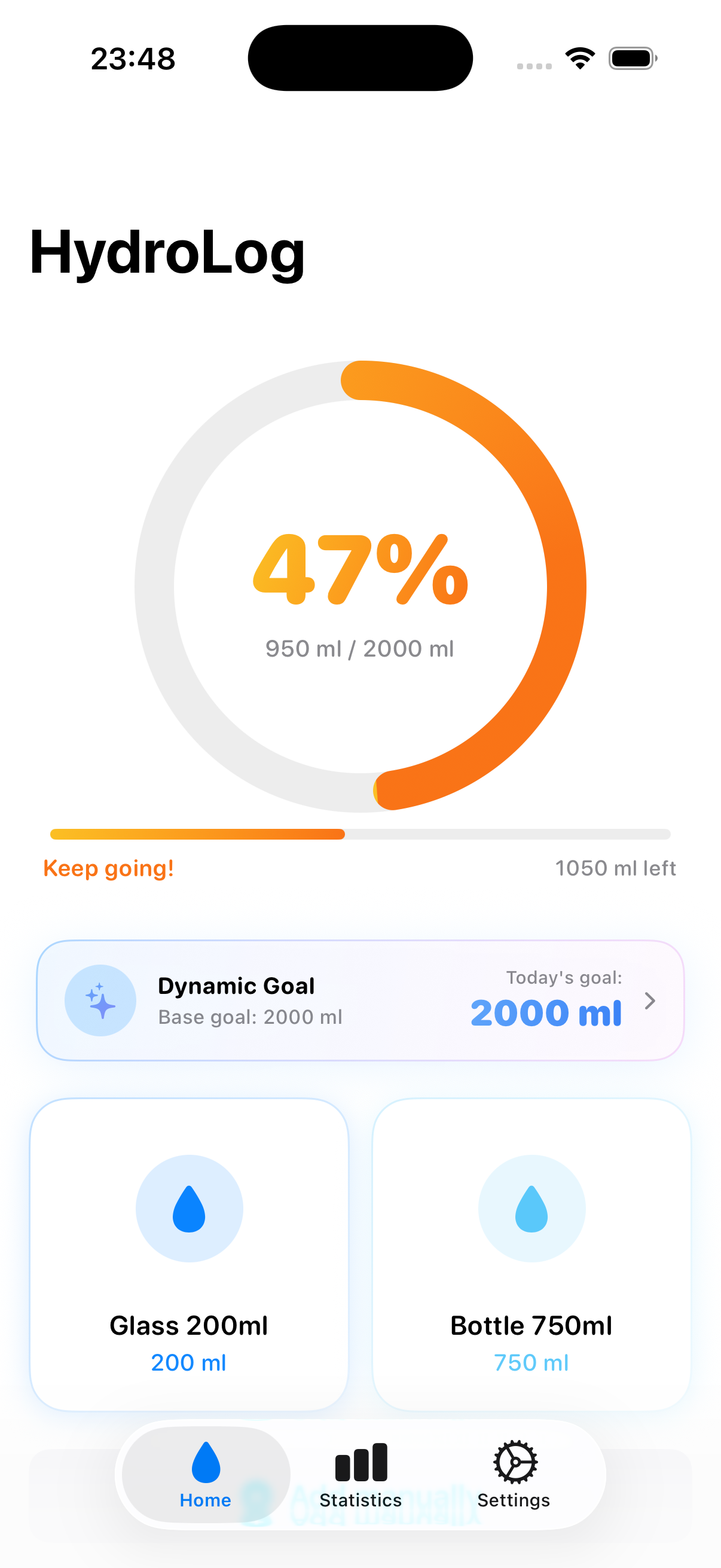
With Premium, your goal adjusts to local weather and reminders adapt to how your day is going.
Everything you need to stay on top of it.
Built for athletes, coffee lovers, responsible drinkers and anyone who wants consistent data across their Apple devices.
Progress rings
See at a glance how close you are to today's goal, with a complete drink catalog behind it.
One-tap logging
Save your own bottles and cups as custom containers and log them instantly.
Apple Health sync
Two-way and automatic. Your water lands in Apple Health, and entries from other apps come back in.
Caffeine and alcohol
Monitored automatically from what you log, so you can spot patterns without extra effort.
Apple Watch and widgets
Log a drink from your wrist in seconds and keep progress on your Home Screen.
Weather-based goals
Your target rises on hot days to match local conditions. Premium.
Smart reminders
Nudges that adapt to your day instead of firing on a fixed timer. Premium.
Analytics and exports
Advanced trends and full history exports for your own analysis. Premium.
Free to track. Premium to adapt.
Everything you need to log and sync is free. Premium makes your goal and reminders respond to your day.
Free
Track every drink, accurately.
- Goal calculated from your weight
- Hydration weighted by drink type
- Caffeine and alcohol monitoring
- One-tap logging and custom containers
- Two-way Apple Health sync
- Apple Watch app and widgets
Premium
A goal that moves with you.
- Dynamic goals
- Weather-based goal adjustments
- Smart reminders that adapt to your day
- Advanced analytics
- History exports
Total privacy. Data Not Collected.
HydroLog has no external servers. Your drinks, goals and history stay on your device and in Apple Health. Location is used only to read local weather for Premium goal adjustments. Read the full privacy policy.
Specifications
iPhone
iOS 18.6+
SwiftUI native
Apple Watch
watchOS 11.6+
Standalone logging
Sync
Apple Health
Read and write
Languages
EN, PT
6.1 MB download
Questions
How does HydroLog set my daily water goal?
Your daily goal is calculated from your body weight. With Premium, dynamic goals also adjust for local weather, so hotter days raise your target.
Does coffee count toward my hydration?
Yes, but not one to one. HydroLog weights each drink by how effectively it hydrates. Coffee, tea, soda, energy drinks, beer and wine use multipliers that reflect their real effect, while caffeine and alcohol are tracked separately.
Does HydroLog sync with Apple Health?
Yes. Sync is two-way and automatic, so water you log in HydroLog appears in Apple Health and entries from other apps are picked up too.
Can I log drinks from my Apple Watch?
Yes. HydroLog has a full Apple Watch app for logging in seconds, plus Home Screen widgets on iPhone.
What does Premium unlock?
Premium unlocks advanced analytics, history exports, dynamic goals, smart reminders that adapt to your day and weather-based goal adjustments.
Is my data private?
Yes. HydroLog uses no external servers and your data stays on your device. The App Store privacy label is Data Not Collected.
What do I need to use HydroLog?
An iPhone running iOS 18.6 or later. The Apple Watch app requires watchOS 11.6 or later. HydroLog is available in English and Portuguese.
Drink smarter, not just more.
Free to download. Your first goal is ready as soon as Apple Health shares your weight.
Get HydroLog