Your Strava weight, always current.
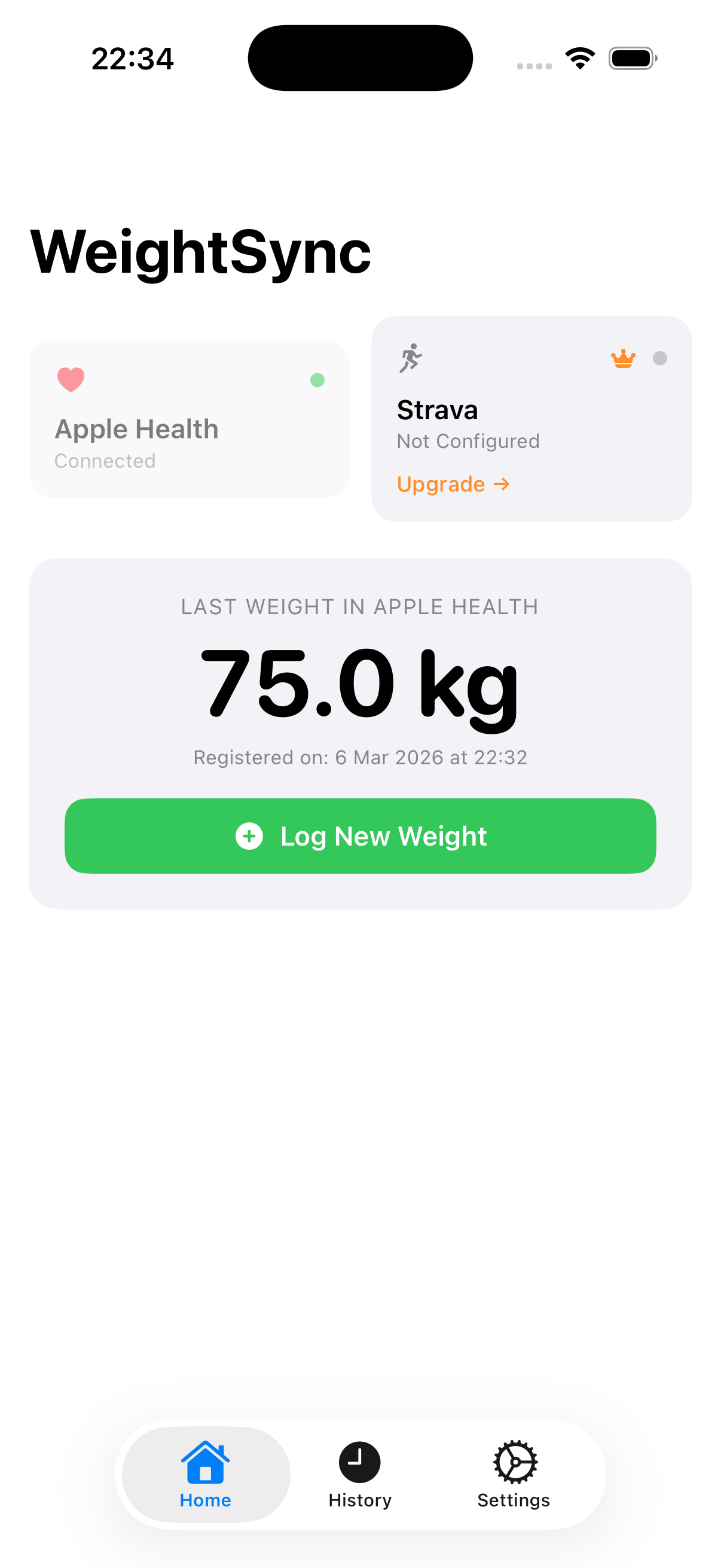
Strava uses your weight for W/kg, power estimates and calories. WeightSync reads every new weigh-in from Apple Health and sends it to Strava in the background, so those numbers stay accurate without you thinking about it.
- 10 languages
- No extra account
- Works when the app is closed
A months-old weight means months-old metrics.
If the number in your Strava profile is out of date, so is everything calculated from it. WeightSync closes that gap for cyclists watching their W/kg, runners managing race weight and triathletes who want metrics they can trust.
W/kg
Power to weight ratio depends directly on the weight in your profile.
Power
Estimated power on rides without a power meter uses your body weight.
kcal
Calorie estimates for every activity scale with your weight.
Set it up once. Then forget it.
-
1
Connect
Link Apple Health and Strava. No extra account to create.
-
2
Weigh in as usual
On a smart scale, in its own app, on your iPhone or on Apple Watch. Anything that writes to Apple Health works.
-
3
It syncs
WeightSync spots the new entry and sends it to Strava in the background, even when the app is closed.
Built around your training routine.
Everything you need to keep your weight consistent and your Strava profile honest.
Background sync
A HealthKit observer catches every new weight and pushes it to Strava automatically.
Retry queue and history
If Strava doesn't respond, your weight is queued and retried. Full sync history, plus an alert if a sync is stuck for 24 hours.
Apple Watch app
Log with the Digital Crown and see your latest weight on a complication.
Widgets and Live Activity
See your weight and the exact time Strava confirmed the sync, right on the Home and Lock Screen.
Siri and Shortcuts
Log your weight or force a Strava sync by voice, without opening the app.
Streaks and milestones
Daily and weekly weigh-in streaks that reward consistency.
Extra weight profiles
Add gear or equipment to the synced value and switch setups with one tap.
Smart reminders
Weigh-in reminders that skip themselves when you've already logged today.
Free to start. Premium to automate.
Strava sync and Premium features are part of the subscription, which starts with a free trial.
Free
Log and keep Apple Health tidy.
- Read your weight from Apple Health
- Manual weight entry
- Save weight back to Apple Health
- Log from Apple Watch
Premium
Hands-off Strava sync, plus insight.
- Automatic background sync to Strava
- Weight chart with 7 day moving average and trend line
- Weekly report every Monday
- CSV export of your full history
- iCloud sync across your devices
- Multiple named extra weight profiles
$0.99
Monthly
$9.99
Yearly
US App Store prices. Local prices may vary.
Private by design
Your weight travels only between Apple Health and Strava. No extra account needed, and nothing collected is linked to your identity. Read the full privacy policy.
Good to know
The Strava API records weight on the day it is sent, not on the original entry date. This is a Strava platform limitation, so your profile always reflects your latest weight rather than a back-dated history.
Questions
Does WeightSync connect to my smart scale?
No. WeightSync reads the weight that is already in Apple Health, whatever put it there: your smart scale's own app, a manual entry on iPhone, or Apple Watch. It then syncs that value to Strava.
Do I need to open the app for it to sync?
No. Once Apple Health and Strava are connected, new entries sync in the background, even when the app is closed. If Strava does not respond, the update is queued and retried automatically.
Why does my weight matter on Strava?
Strava uses your profile weight to estimate power, calories and power to weight ratio (W/kg). If that number is months old, those metrics are too.
What is free and what is Premium?
Free covers reading from Apple Health, manual entry, saving back to Apple Health and logging from Apple Watch. Strava sync and the Premium features are part of the subscription, which starts with a free trial.
Why does Strava show the sync date instead of my weigh-in date?
The Strava API records weight on the day it is sent, not on the original entry date. This is a Strava platform limitation.
Is my weight stored on your servers?
No. Your weight travels only between Apple Health and Strava, and no extra account is needed.
What do I need to use WeightSync?
An iPhone running iOS 17.6 or later and a Strava account. The Apple Watch app requires watchOS 10.6 or later. Available in English, Arabic, French, German, Italian, Japanese, Korean, Portuguese, Simplified Chinese and Spanish.
Weigh in. We'll handle Strava.
Free to download. Try Premium free and see your metrics stay accurate from day one.
Get WeightSyncQuestions? support@weightsync.app